جديد بلوجر تغيير شكل المشاركات الشائعة مع اضافة نجوم بالتصنيف
السلام عليكم
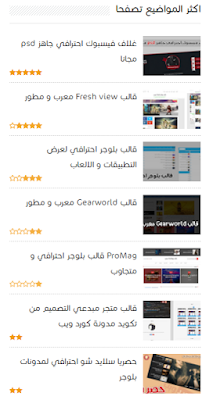
نعود اليكم من جديد بشرح جديد و اضافة جديدة على موقع الخبير برو
اضافتنا اليوم خاصة بمدونات وهي :
طريقة اضافة النجوم بالتصنيف الى المشاركات الشائعة و ايضا سيتم تغيير شكل المشاركات الشائعة.
و النجوم بالتصنيف ما يعطي المدونة شكل اجمل .

- لوحة التحكم
- قالب
- تحرير HTML
4. ابحث عن </head> وضع فوقه هذا الكود
<style>/* Popular Post S1 */.PopularPosts ul{background:#fff;list-style:none;margin:0;padding:5px 5px 0;overflow:hidden;border-top:none}.PopularPosts li,.PopularPosts li img,.PopularPosts li a,.PopularPosts li a img{margin:0;padding:0;list-style:none;border:none;background:none;outline:none}.PopularPosts ul{margin:0;list-style:none;color:#64707a}.PopularPosts ul li img{background: #FFFFFF; display: block; margin: 0 0 0 0; width: 60px; height: 60px; overflow: hidden; float: right; margin-left: 10px; border: 1px solid #EAE8E8; padding: 3px;}.PopularPosts ul li{position:relative;background-color:#fff;margin:0;padding:.7em 0!important;border:0;position:relative;border-bottom:1px dotted rgba(0,0,0,0.2)}.PopularPosts ul li:before{font-family:fontawesome;content:'\f005\f005';display:inline-block;position:absolute;color:#f39c12;text-align:center;bottom:0;left:0;margin:9px 0;font-size:11px;padding:0;font-weight:normal;line-height:normal;transition:all .3s}.PopularPosts ul li:nth-child(1):before{font-family:fontawesome;content:'\f005\f005\f005\f005\f005';}.PopularPosts ul li:nth-child(2):before{font-family:fontawesome;content:'\f006\f005\f005\f005\f005';opacity:.9}.PopularPosts ul li:nth-child(3):before{font-family:fontawesome;content:'\f006\f006\f005\f005\f005';opacity:.85}.PopularPosts ul li:nth-child(4):before{font-family:fontawesome;content:'\f006\f006\f006\f005\f005';opacity:.8}.PopularPosts ul li:nth-child(5):before{font-family:fontawesome;content:'\f006\f006\f006\f006\f005';opacity:.75}.PopularPosts ul li:hover:before{opacity:1}.PopularPosts ul li:first-child{border-top:none}.PopularPosts ul li:last-child{border-bottom:none}.PopularPosts ul li .item-title a,.PopularPosts ul li a{color: #333; font-size: 14px;}.PopularPosts ul li a:hover{color:#2476e0;}.PopularPosts .item-thumbnail{margin:0; float: right;}.PopularPosts .item-snippet{display:none}.PopularPosts .item-title{font-weight:100;padding-bottom:.2em;padding:0 5px}</style><link href='//maxcdn.bootstrapcdn.com/font-awesome/4.4.0/css/font-awesome.min.css' rel='stylesheet'/>
5. واخيرا اضغط على حفظ و مبروك


تعليقات
إرسال تعليق